
If you’ve seen a coach, usher, or event volunteer pressing a small metal device over and over, you’ve seen a tally clicker. It’s one of the simplest counting tools there is — but it goes by many names, comes in several forms, and the right one depends on what you need to count.
This guide explains exactly what a tally clicker is, what its parts do, and how to pick the right one.
What Is a Tally Clicker?
A tally clicker is a small counting device that adds one to a running total every time you press its button. It replaces counting in your head or making marks on paper, so you can keep your attention on what you’re counting.
The name comes from the “click” a mechanical model makes with each press. Today the term also covers digital clickers with a screen and online clickers you use in a web browser.
Other Names for a Tally Clicker
You’ll see the same device sold and described under several names. They all refer to the same basic tool:
- Tally counter — the most common general term.
- Hand tally counter or hand counter — usually a handheld mechanical model.
- Click counter or clicker counter — common in everyday use and for online tools.
- People counter — when it’s used for headcounts at doors and events.
- Lap counter — when it’s used in running, swimming, or cycling.
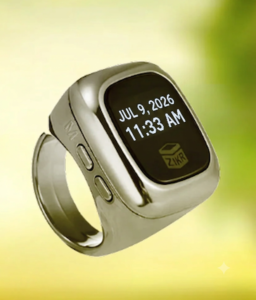
- Finger counter or ring counter — a small digital model worn on a finger, often used for prayer counting.
Parts of a Tally Clicker
Mechanical tally clicker
- Count button — the plunger you press with your thumb.
- Number wheels — usually four, shown through a small window.
- Reset knob — a small knob you turn to return all wheels to zero.
- Finger ring or lanyard loop — helps you hold it securely or hang it around your neck.
- Metal or plastic case — protects the gears inside.
Digital tally clicker
- LCD or LED screen — shows the count, often with more digits than a mechanical model.
- Count and reset buttons — some models add a count-down button.
- Battery compartment — most use a small coin-cell battery.
- Backlight or memory — available on some models.
Online tally clicker
An online clicker replaces the physical parts with on-screen buttons: plus, minus, and reset, plus options like naming a counter or adding more counters. Our free online tally counter is an example. To see what happens behind those buttons, read How Does an Online Click Counter Work?
Tally Clicker vs Tally Marks
Tally marks are the lines you draw on paper, usually grouped in fives. A tally clicker does the same job without pen and paper, and keeps a running total for you. Clickers are faster and easier when counts get large or when you’re counting on the move. To learn the paper method, see What Do 5 Tally Marks Mean?
How to Choose a Tally Clicker
Ask yourself these questions before you buy or pick a tool:
1. Do you need to count without looking?
A mechanical clicker gives a clear physical click you can feel, so you can count while watching a door or a field. Screen-based options need more attention.
2. How high will you count?
Most mechanical clickers have four number wheels, so they go up to 9,999 and then roll back to zero. Digital and online counters can usually go much higher. More detail is in What Is the Limit of a Tally Counter?
3. Do you need to count down or fix mistakes?
Basic mechanical clickers only count up. If you need a minus button — for tracking people leaving a room, for example — choose a digital model or an online counter.
4. Are you counting more than one thing?
One clicker counts one thing. To track several categories at once, use a multi-channel counter or an online tool that lets you add and name several counters.
5. Will you be outdoors or away from power?
Mechanical clickers need no batteries and handle rough use well. Digital models need a battery, and online tools need a charged phone. See Do Tally Counters Need Batteries?
6. Does noise matter?
Mechanical clickers are audible. In a quiet setting — a place of worship, a library, an exam hall — a digital ring counter or a phone on silent is less distracting.
Quick Picks by Situation
- Door or event headcounts: mechanical clicker, or a digital one if you need to count people leaving too.
- Prayer or dhikr counting: digital finger ring counter — quiet and hands-free.
- Several categories at once (for example, adults and children): an online counter with multiple named counters.
- Outdoor sports and laps: mechanical clicker on a lanyard.
- Occasional, one-off counts: a free online counter on your phone.
Prefer a physical device? Browse handheld and finger-ring counters in our shop. For a deeper comparison of each type, see What Are the Different Types of Tally Counters?
FAQs About Tally Clickers
Is a tally clicker the same as a tally counter?
Yes. “Tally clicker” and “tally counter” describe the same device. “Clicker” simply refers to the sound a mechanical model makes.
How do you reset a tally clicker?
On a mechanical clicker, turn the small reset knob until all wheels show zero. On a digital model, press the reset button (some require holding it for a second or two). Online counters have an on-screen reset button.
What happens after a mechanical clicker reaches 9,999?
On a standard four-digit model, the next press rolls the display back to 0000. If you expect to go past that, note the total before it rolls over or use a digital counter.
Can I use my phone as a tally clicker?
Yes. A browser-based counter works on any phone without installing an app. See Can I Use a Tally Counter on My Phone?
What are tally clickers used for?
Anything you need to count one at a time: people, laps, reps, items, or prayers. For a full list by field, read What Is a Tally Counter Used For?
Conclusion
A tally clicker is a simple device that adds one to a total each time you press it. Whether you call it a tally counter, hand counter, or clicker, the right choice comes down to a few practical questions: how high you’ll count, whether you need to count down, how many things you’re tracking, and where you’ll be using it.