
Counting one thing is easy: press once per item. Counting several things at the same time — adults and children at an entrance, cars, bikes and trucks at a junction, or three types of behaviour in a classroom — is where totals start to go wrong. You need a way to keep each category separate without losing track of any of them.
This guide covers the four practical ways to count multiple categories at once, how to set each one up, and the habits that keep your numbers accurate.
When You Need to Count More Than One Thing
Multi-category counting comes up whenever a single total isn’t enough. A few common examples:
- Events: adults and children, members and guests, or people entering and leaving.
- Traffic surveys: cars, motorcycles, buses and trucks passing a point.
- Nature and field work: different bird species, or plants by type along a path.
- Classrooms and research: different behaviours during an observation session.
- Stock and sorting: items by size, colour or product line.
- Sports: shots, passes and fouls for one player or team.
For more ideas by field, see Why Do People Use Tally Counters?
Method 1: Several Online Counters on One Screen
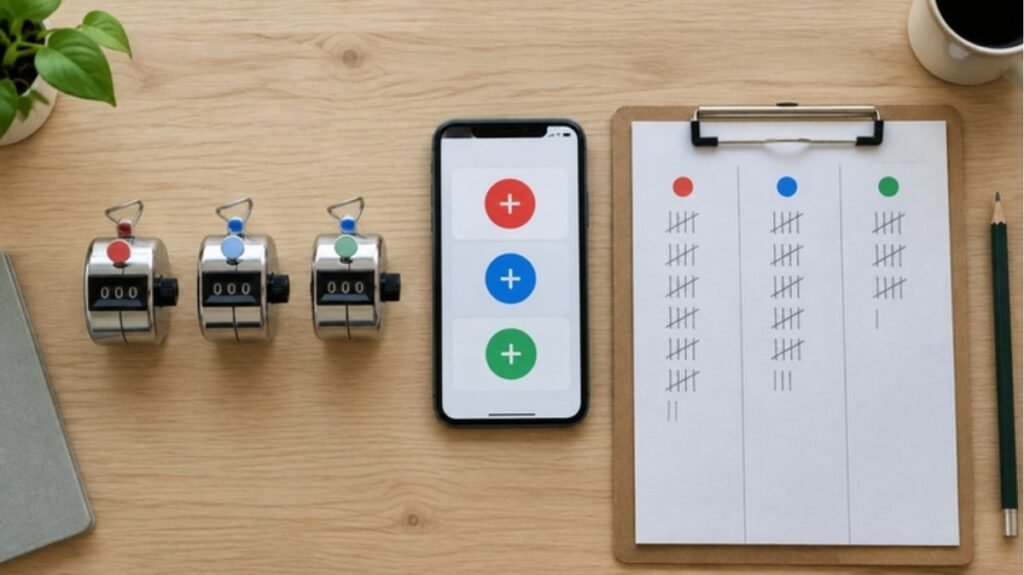
An online counter that supports several named counters is the quickest option if you have a phone, tablet or laptop with you. Each category gets its own counter with its own buttons, so you only need one device.
Here’s how to set it up on our free online multiple tally counter:
- Add a counter for each category. New counters start as “Counter 1”, “Counter 2” and so on.
- Rename each one. Tap the counter’s name, type a short name such as “Adults” or “Trucks”, and press Enter.
- Count with + and −. Tap + for each item. If you over-count, tap − to correct it; a counter never goes below zero.
- Add up the total yourself. Each counter shows its own number, and the total of all counters is shown at the top of the tool.
- Reset when you’re done. Reset a single counter, or use Reset all to set every counter back to zero while keeping their names for next time.
Your counters and their names are saved in that browser on that device, so you can close the tab and pick up where you left off. They don’t sync between devices, and they’re cleared if you use a private window or clear your browsing data — so use Copy or CSV (or write the totals down) for anything important.
Best for: two to six categories, counting while seated or standing still, and situations where you’ll glance at a screen anyway.
Method 2: One Handheld Counter per Category
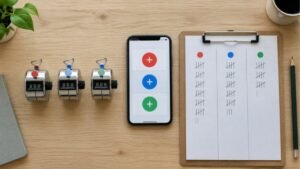
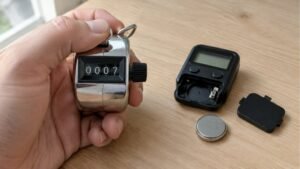
For two categories, the simplest physical setup is one handheld counter in each hand — for example, the left hand for people entering and the right hand for people leaving. Because you can feel each button, you can keep your eyes on what you’re counting.
- Use counters that look or feel different (different colours, or a sticker on one) so you never mix them up.
- Decide which hand means which category before you start, and say it out loud or write it down.
- For more than two categories, have more than one person count, each holding one or two counters.
Best for: two categories, fast-moving counts, and outdoor or standing work where a screen is impractical. Not sure which kind of counter to use? See What Are the Different Types of Tally Counters?
Method 3: A Multi-Unit Desk Counter
Multi-unit counters (sometimes called counter banks or desk tally counters) mount several mechanical counters side by side on one base. Each unit has its own button and display, and they are widely used in laboratories — for example, when counting different cell types under a microscope — as well as in traffic surveys and quality checks.
- Label each button with tape or a marker so every category is clear.
- Keep the base on a flat surface and rest your fingers over the buttons, like a small keyboard.
- Some models include a separate unit that adds up the total automatically; if yours doesn’t, add the units together at the end.
Best for: three or more categories, counting at a desk or bench, and repeated sessions where speed matters.
Method 4: A Tally Sheet With Columns
A sheet of paper with one column per category still works well, especially for slower counts. Draw a column for each category, make one tally mark per item, and group them in fives so the totals are quick to add up. If you need a refresher on the grouping, read What Do 5 Tally Marks Mean?
The trade-off: you need a surface and both hands, and every mark takes your eyes away from what you’re counting. Paper is a good backup to the other methods, or the main method when items arrive slowly.
Which Method Should You Use?
- Two categories, fast pace, eyes up: two handheld counters.
- Two to six categories, one device: several online counters on one screen.
- Three or more categories at a desk: a multi-unit desk counter.
- Slow counts, or as a backup record: a tally sheet.
- Many categories at a busy event: split the categories between two or more people.
Tips for Accurate Multi-Category Counts
Define every category before you start
Decide exactly what belongs where. Does a teenager count as an adult or a child? Is a van a car or a truck? Write the rules down so everyone counting — and you, an hour later — applies them the same way.
Keep the number of categories manageable
The more categories one person tracks, the more likely a press lands in the wrong place. If items arrive quickly, keep it to a few categories per person and split the rest.
Use short, clear names and a fixed layout
Short names such as “Car”, “Bike” and “Truck” are faster to read than long ones. Keep counters in the same order every time, so your fingers learn where each one is.
Record totals at regular intervals
For long sessions, note every category’s number every 15 or 30 minutes. If something goes wrong later, you only lose a short stretch instead of the whole count, and you also get a useful picture of when things were busiest.
Cross-check your totals
If you also know the overall number from another source — tickets sold, a sign-in sheet, or a separate total counter — compare it with the sum of your categories. A big gap means a category was missed or double counted. For attendance-specific advice, see Can I Use a Clicker Counter to Count People? and Can I Use a Clicker Counter to Count People?
Example: Counting a Junction in Three Categories
Say you need to count traffic at a junction for one hour in three groups: cars, two-wheelers, and heavy vehicles.
- Write down the rules: vans count as cars; buses and trucks are heavy vehicles; bicycles and motorcycles are two-wheelers.
- Open three online counters and name them “Car”, “2-Wheel” and “Heavy” — or use a three-unit desk counter with labelled buttons.
- Start a timer and count each vehicle as it crosses a fixed line.
- Every 15 minutes, write down all three numbers.
- At the end of the hour, add the three counters for the total and compare each 15-minute block to see when traffic peaked.
FAQs
Can one tally counter count more than one thing?
A single-button counter keeps one total, so it can’t separate categories. Use several counters — physical or online — or a multi-unit counter with one button per category.
How many categories can I count at once?
There’s no fixed rule, but accuracy drops as the number grows, especially when items arrive quickly. Most people stay accurate with a handful of categories; beyond that, split the work between people.
Does the online counter show a grand total?
Yes. The total of all your counters is shown at the top of the tool, above the counters.
What if I press the wrong category?
On an online or digital counter with a minus button, subtract one from the wrong category and add one to the right one. On a mechanical counter that only counts up, note the correction on paper and adjust the totals at the end.
Conclusion
Counting several things at once comes down to giving every category its own counter and its own clear rule. Use two handheld counters for quick two-way counts, several online counters when one screen is enough, a multi-unit desk counter for detailed bench work, and a tally sheet as a backup. If a counter starts misbehaving partway through, our guide Tally Counter Not Working? covers the usual fixes. To start right away, open the free online tally counter and add a counter for each category.